
It is 11:30 PM. Maya sits alone on her sofa, scrolling through her phone. Earlier that evening, she took photos of a medical bill, recorded a quick voice note about a stressful meeting at work, and texted her sister about a surprise birthday trip.
Her phone’s built-in artificial intelligence assistant silently gets to work. Within seconds, it reads the medical bill to set a payment reminder, summarizes her voice note into a to-do list, and suggests flight prices for the birthday trip. It feels like magic.
Then Maya pauses and looks at the glowing screen. She has not turned on airplane mode. Her Wi-Fi icon is blinking steadily. A cold question enters her mind: Did my private medical bill and secret voice note just travel across the internet to a giant corporate computer, or did they stay right here in my hand?
That single question sits at the heart of the biggest change in consumer technology. For years, using artificial intelligence meant sending your questions, photos, and voice recordings to distant data centers owned by large tech companies. By 2027, that old model is changing fast. Understanding on-device AI and privacy is no longer just a topic for computer engineers. It is something every person with a smartphone, laptop, or smartwatch needs to understand to protect their personal life.
Table of Contents
What Is On-Device AI and Why Does It Matter?
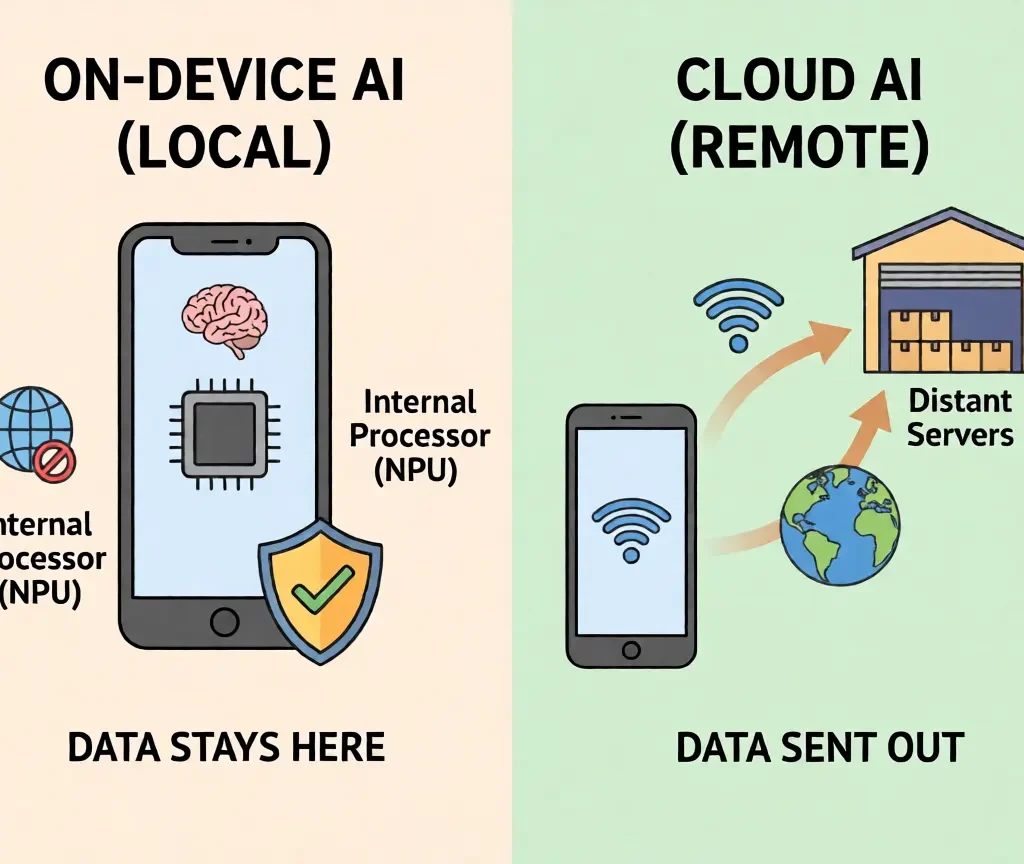
To understand on-device AI and privacy, picture the difference between cooking dinner in your own kitchen versus ordering takeout from a restaurant across town.
When you use traditional cloud AI, your phone acts like a telephone taking an order. You speak a question, your phone sends your voice over the internet to a massive warehouse full of computers (called “the cloud”), those computers figure out the answer, and they send it back to your screen.
On-device AI means the cooking happens right inside your own kitchen. Your phone, laptop, or smartwatch has enough brainpower to run smart programs directly on its own hardware, without needing to send your personal information over the internet.
Why is this moving so fast as we look toward 2027? Three big reasons drive this change:
- Speed: Data does not have to travel hundreds of miles to a server and back. Answers appear almost instantly.
- Offline Access: Your smart tools keep working on an airplane, in a subway tunnel, or during a power outage.
- Personal Privacy: If your photos, health stats, and messages never leave your device, hackers cannot intercept them on the internet, and companies cannot easily store them on external servers.
Even if you know nothing about computer science, this matters to you. Every time you unlock your phone with your face, ask for directions, or let an app organize your family photos, you are trusting a machine with pieces of your life.
How On-Device AI Actually Works
Running artificial intelligence inside a pocket-sized phone used to be impossible because AI programs were too big and hungry for electricity. Today, engineers solve this using special hardware and smarter software.
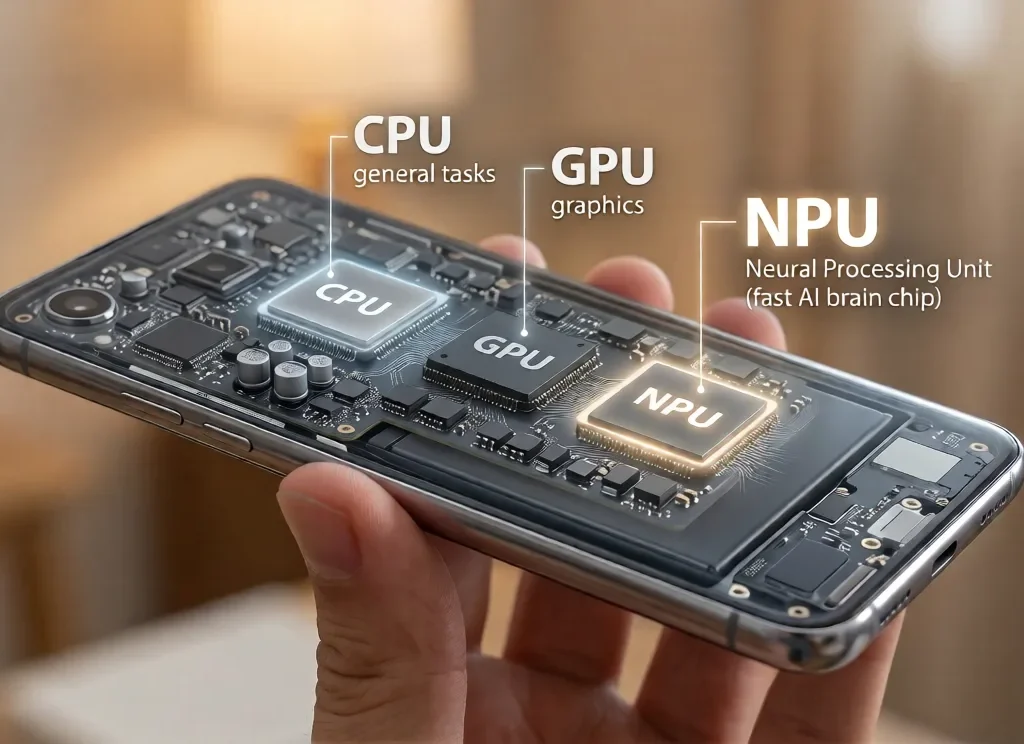
- The NPU (Neural Processing Unit): A regular phone has a main brain called a CPU (Central Processing Unit) that handles everyday tasks like opening apps. Modern devices add an NPU. Think of an NPU as a specialized math calculator built specifically for artificial intelligence. It solves thousands of tiny pattern puzzles at once while using very little battery power.
- High-Speed Memory (RAM): AI models need fast short-term memory to hold information while they think. Newer phones and computers pack extra memory just so the AI can read your screen or listen to your voice smoothly.
- Small Language Models (SLMs): Giant cloud AI systems are like massive encyclopedias containing everything on the internet. On-device AI uses “compressed” or smaller models. Engineers shrink the AI so it fits comfortably on your device’s storage while still being smart enough to summarize texts, edit photos, and translate languages.
What still needs the cloud? If you ask your phone to write a 20-page history report or search live sports scores from two minutes ago, your device still needs the internet. Local AI handles your personal, immediate tasks, while the cloud handles massive global knowledge.
On-Device AI vs. Cloud AI: A Clear Comparison
Neither system is automatically “better” for every job. Each has strengths depending on what you are trying to do.
| Factor | On-Device AI | Cloud AI |
| Data Processing | Happens locally on your phone, laptop, or watch. | Happens on remote servers owned by tech companies. |
| Privacy | High potential privacy; personal files can stay local. | Lower default privacy; data travels over networks. |
| Internet Dependency | Works offline for core tasks. | Requires a steady internet connection. |
| Response Speed | Near-instant; no network travel delay. | Can lag if internet signal is weak or servers are busy. |
| Cost | Included in the device price; low ongoing server cost. | Expensive to run; often requires monthly subscriptions. |
| Processing Power | Limited by device battery size and heat limits. | Massive computing power across thousands of chips. |
| Updates | Requires downloading full software updates to your device. | Updated silently and instantly on company servers. |
| Security Risks | Vulnerable if someone steals your unlocked physical device. | Vulnerable to server data breaches and network interception. |
The Rise of Hybrid AI
In reality, most devices use Hybrid AI. Your phone acts like a smart gatekeeper. Simple, private tasks—like sorting your photos or checking your calendar—stay on your device. When you ask a complex question that requires fresh internet data, your phone strips away your personal identity if possible and sends only the general question to the cloud. Systems like Apple’s Private Cloud Compute are designed specifically to bridge this gap by processing complex requests on locked-down servers that erase data immediately after answering.
Why On-Device AI and Privacy Matter in 2027
We can already see basic on-device AI today in voice-to-text typing and camera auto-focus. However, industry roadmaps from chipmakers like Qualcomm and software leaders at Google AI point toward a major expansion by 2027. Here is what is already here versus what experts expect to mature by 2027:
- AI Smartphones (Available now, expanding in 2027): Current phones summarize emails and erase unwanted objects from photos locally. By 2027, phones are expected to run “AI agents” that act across multiple apps—like reading a text message, checking your calendar, and drafting a reply—completely offline.
- Personal AI Assistants (Evolving rapidly): Today’s assistants still rely heavily on the cloud for complex conversations. By 2027, local assistants are anticipated to remember your personal preferences over months without uploading a personal profile to an ad company.
- Smart Glasses and Wearables (Early stage now, growing by 2027): Smart glasses already use cameras to identify landmarks. As chips shrink, 2027 wearables aim to translate spoken conversations in real time right inside the glasses, preventing continuous video and audio streaming to the cloud.
- Connected Cars (Available in newer models, standardizing by 2027): Modern vehicles use local chips to detect driver drowsiness and lane drifting without needing cell towers. By 2027, in-cabin voice assistants are expected to process navigation and vehicle controls locally, keeping your daily driving routes private.
- Smart Homes (Transitioning through 2027): Many security cameras currently charge monthly fees to analyze video in the cloud. Newer home hubs process person-and-package detection inside your living room, keeping footage off external servers.
- Healthcare Devices (Strictly regulated, growing carefully): Smartwatches already detect irregular heart rhythms locally. By 2027, researchers expect more health trackers to analyze sleep and stress patterns on the wrist before sharing only summary reports with your doctor.
- Business Computers (Available now via AI PCs): Companies are adopting laptops with built-in NPUs so employees can summarize confidential financial reports without leaking company secrets to public chatbots.
- Offline AI Applications (Growing steadily): Educational apps, language tutors, and writing tools are increasingly offering downloadable “offline modes” for students and travelers without reliable internet.
The Five-Layer Privacy Test
Before you buy a new AI gadget or turn on a smart feature, use this simple five-layer test to check if it truly respects your boundaries:
- Layer 1: Data Collection — What information does the device gather? Does a flashlight app really need access to your microphone and location? Always check what sensors the AI uses.
- Layer 2: Local Processing — Where does the thinking happen? Look for clear labels stating whether data stays on the device or travels to a cloud server.
- Layer 3: User Control — Can you say no? A trustworthy device lets you turn off AI features completely, delete your saved history, and revoke app permissions with one tap.
- Layer 4: Security — Is your stored data locked? Even if data stays on your phone, it must be protected by strong encryption (scrambling data so thieves cannot read it) and regular security patches.
- Layer 5: Transparency — Does the company speak plainly? If a company hides its data practices behind 50 pages of confusing legal words, treat that as a warning sign.
Three Real-World Examples
To see how on-device AI and privacy work in daily life, let us look at three practical scenarios.
1. Organizing Family Photos on a Personal Smartphone (Commercially Available Today)
Imagine you type “kids at the beach” into your phone’s photo app. On modern smartphones, a local AI model scans your photo library directly on your phone’s storage. It recognizes faces, sand, and ocean waves without uploading a single picture to the company’s servers. Your family memories stay in your pocket, yet you still get fast search results.
2. Monitoring Heart Health on a Wearable Watch (Available Today, Expanding Toward 2027)
Consider a smartwatch tracking your heart rate while you sleep. Local algorithms check for unusual patterns right on your wrist. This protects your raw biometric data from being sold to advertisers. However, there is a limit: if you choose to sync that health app with a cloud backup or share it with an insurance wellness program, your data leaves the safety of the watch and enters the cloud.
3. Reviewing Confidential Contracts at Work (Emerging Enterprise Practice)
Suppose a small law firm wants to summarize 100-page client contracts using AI. If a lawyer pastes those contracts into a free public website, that private client data might be stored or used to train future AI models. Instead, the firm uses business laptops equipped with local NPUs running an offline AI model. The laptop reads and summarizes the PDF files locally, ensuring client secrets never cross the internet.
Expert Interpretation: Is On-Device AI a Privacy Revolution?
As an educator and technology analyst, I often hear marketing claims that on-device AI makes privacy automatic. That is not completely true. While local processing is a huge step forward, privacy depends on the entire system, not just where the math happens.
Can manufacturers still access information on AI devices? Sometimes, yes. Even if the AI runs locally, your device might still send small “usage reports” or crash logs back to the manufacturer. Furthermore, local processing does not stop surveillance if you install invasive apps that ask for permission to read your contacts and location.
We also have to ask who controls the AI model. A phone maker controls when and how your local AI gets updated. And if a malicious app sneaks onto your phone, it could try to read the helpful personal summaries your local AI created. Consumers must understand that local AI reduces the risk of giant cloud data leaks, but it puts more responsibility on us to keep our physical devices locked and clean.
What the Research and Data Show
Independent surveys show why people are demanding better privacy controls right now:
- Deep Consumer Distrust: According to the Thales Digital Trust Index 2026, a survey of more than 15,000 consumers worldwide found that only 23% trust companies to use AI responsibly with their personal data, while 77% worry about AI agents acting on their behalf online. What this means: Most people want smart tools, but they do not trust corporations to guard their secrets. Limitation: Surveys measure how people feel, not how secure a specific technology actually is.
- Growing Security Fears: A Pew Research Center survey of 5,119 U.S. adults published in February 2026 found that 71% expect AI to make their personal information less secure, while only 3% think it will make data more secure. What this means: Everyday users feel exposed when using cloud-based AI tools. Limitation: This study focused on U.S. adults and reflects anxiety about cloud chatbots rather than newer local chips.
- Corporate Privacy Spending: The Cisco 2026 Data and Privacy Benchmark Study, surveying 5,200 security professionals, reported that 90% of organizations expanded their privacy programs specifically because of AI. What this means: Businesses realize they cannot win customer trust without stronger data protection. Limitation: Expanding a privacy budget does not guarantee that every product a company releases is free of flaws.
Note on 2027 Data: Because 2027 is still ahead of us, verified adoption numbers for 2027 do not exist yet. Current 2026 studies give us our clearest baseline for how consumer pressure is pushing tech companies toward local AI.
Advantages and Limitations of On-Device AI
Advantages
- Works Without Internet: Helpful during travel, emergencies, or in areas with poor cell service.
- Faster Responses: Eliminates the delay of sending data to distant servers.
- Stronger Data Control: Keeps sensitive photos, voice notes, and health stats off corporate servers.
- Lower Data Usage: Saves mobile data plans by reducing constant background uploads.
- No Subscription Fees: Many local features run free on the hardware you already bought.
Limitations
- Limited Brainpower: Smaller local models can make more factual mistakes than giant cloud models.
- Battery Drain: Running heavy AI tasks locally warms up your phone and drains the battery faster.
- Storage Space: Local AI models take up several gigabytes of space on your device.
- Physical Theft Risk: If someone steals your unlocked phone, all your local AI summaries are right there.
- Update Delays: Fixing a mistake in a local AI model requires downloading a large system update.
Five Common Misconceptions Corrected
- Misconception: On-device AI means data never leaves your device.Truth: Many apps use hybrid AI. Even if the main feature runs locally, backup copies, account logins, or analytics may still sync with the cloud.
- Misconception: Local AI cannot be hacked.Truth: Any computer connected to the internet can be targeted by malware or phishing scams. Local AI removes cloud server leaks, not device viruses.
- Misconception: Buying an “AI Smartphone” automatically protects your privacy.Truth: Hardware is only a tool. If you sign in to invasive social media apps and grant them full permissions, your data is still being tracked.
- Misconception: Turning off cloud AI makes every feature private.Truth: Some features may stop working completely when cloud access is disabled, while other apps may continue collecting basic location or usage data.
- Misconception: Faster AI chips always mean better security.Truth: Speed and security are separate. A fast NPU processes photos quickly, but only dedicated security chips and encryption keep that data locked.
Your Practical Privacy Checklist
You do not need to be a cybersecurity expert to protect yourself. Follow these simple steps today:
- Review App Permissions: Open your phone settings and remove microphone, camera, and location access from apps that do not need them.
- Check Cloud Backups: Decide if you truly want every photo and voice note automatically uploaded to cloud storage.
- Test Offline Mode: Turn on Airplane Mode and test your favorite AI features. This quickly shows you which tools truly work locally.
- Install Security Updates: Never ignore system updates; they fix security holes that hackers use to reach local data.
- Use Strong Locks: Protect your device with a strong six-digit passcode or biometric lock (fingerprint or face scan).
- Read Plain-English Privacy Labels: Check the app store privacy summaries before downloading new AI assistants, and review guidance from trusted groups like the National Institute of Standards and Technology (NIST) or the European Union Agency for Cybersecurity (ENISA).
- Keep Secrets Out of Public Chatbots: Never paste passwords, bank details, or private medical records into free online AI websites.
Frequently Asked Questions (FAQ)
1. What is on-device AI and privacy? It refers to running artificial intelligence directly on your personal device’s hardware—like a phone or laptop—rather than sending your personal data to distant cloud servers, helping keep your information under your control.
2. How does on-device AI protect personal information? By processing photos, voice commands, and text locally on your device’s chip, sensitive information does not need to travel across the internet or sit on corporate servers where data breaches can happen.
3. Is on-device AI safer than cloud AI? For keeping personal files private from corporate tracking and server breaches, yes. However, cloud AI is still protected by professional server security, whereas on-device AI relies heavily on you keeping your physical device locked and updated.
4. Can on-device AI work without the internet? Yes. Core tasks like voice dictation, photo sorting, language translation, and text summarization can run smoothly in Airplane Mode if the AI model is stored locally.
5. Can smartphone AI access private photographs and messages? Yes, built-in system assistants often have permission to scan your photos and messages to help you search or reply faster. You can limit or turn off this access in your device’s privacy settings.
6. Does on-device AI prevent all data tracking? No. While it reduces data sent during AI tasks, websites, browsers, and third-party apps can still track your online activity unless you adjust your privacy settings.
7. What are the main privacy risks of AI-powered smartphones? The biggest risks include hidden cloud syncing, malicious third-party apps reading local data, and physical theft if a device is stolen while unlocked.
8. Will on-device AI become more common in 2027? Yes. Chip manufacturers and software companies are actively building stronger local processors so that smartphones, laptops, cars, and wearables can handle more advanced AI tasks offline by 2027.
9. How can users protect their privacy when using AI? Keep your device updated, turn off unnecessary cloud backups, restrict app permissions, test which AI features work offline, and avoid sharing sensitive personal secrets with unverified AI apps.
Conclusion: Smarter Machines, Safer Lives
Let us return to Maya sitting on her sofa at 11:30 PM. In a world powered by true local intelligence, Maya does not have to wonder where her medical bill or her sister’s birthday surprise went. Her phone’s NPU reads the bill, sets the reminder, and keeps every byte of that personal information locked inside the glass and metal in her hand.
That is the real promise of on-device AI and privacy as we move toward 2027. Artificial intelligence can become genuinely helpful without forcing us to surrender our personal lives to distant servers. Still, technology alone will never protect us automatically. As standards bodies like IEEE and consumer advocates remind us, the future of AI should never be measured only by how fast or clever a machine feels. It must be measured by transparency, security, and respect for human boundaries—because the smartest technology in the world is only worth trusting when it knows how to keep a secret.